ShixxNOTE Desktop Sticky Notes with LAN Messaging

Keep reminders on your screen and message your team over the local network

Instant Messenger Local Area Network

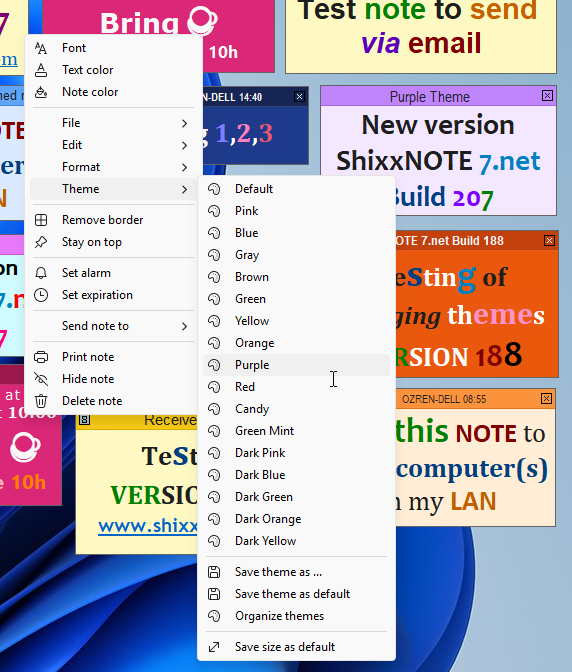
ShixxNOTE program Lock "Show All Notes" with password ShixxNOTE program "Send note to other" dialog ShixxNOTE program "Send note to other" dialog ShixxNOTE program "Send note to other" "Network" settings dialog called from main program menu" "Export note(s)" dialog called from main program menu Change note theme menu called from "note menu" Default note settings dialog called from main program menu Alarm dialog set on one desktop note Format text "Bullet style" menu called from "note menu"

Q&A - Questions and Answers


General Information

ShixxNOTE vs standard Windows Sticky Notes

Windows Sticky Notes are for personal use on one computer only. ShixxNOTE enables communication between multiple computers over LAN, making it suitable for teams and offices.

Difference Between ShixxNOTE 6.net and 7.net version 📝

  1. Network Discovery Engine
    The key difference between ShixxNOTE 6.net and ShixxNOTE 7.net is the way each version discovers computers on the local network.

    ShixxNOTE 6.net
    This version uses an old Windows network‑browsing function (NetBIOS/Network Neighborhood) to automatically search the local LAN for all Windows computers. Microsoft has removed and deprecated this functionality in modern systems, which means:

    • it does not work reliably on fully updated Windows 10 or Windows 11 machines
    • the old network discovery method is effectively obsolete

    Because of this, ShixxNOTE 6.net cannot automatically detect computers on today’s Windows platforms.

    ShixxNOTE 7.net
    This version includes a completely new, modern network‑scanning engine developed specifically to replace the old Windows function. The new system:

    • runs in the background without slowing down the PC
    • scans the entire local network using modern Windows networking protocols
    • correctly identifies all devices on the LAN
    • automatically filters out non‑computer devices (phones, printers, routers, TVs, etc.)
    • works reliably on Windows 10 and Windows 11

    This new discovery engine is the biggest improvement in ShixxNOTE 7.net and ensures full compatibility with current and future Windows versions.

  2. Bug fixes and stability improvements. Several issues from 6.net (startup behavior, note layering, reminder reliability) have been fixed.
  3. Future‑proof development. Version 6.net is no longer updated, while 7.net receives ongoing maintenance and compatibility updates.
  4. Refreshed user interface. Notes, menus, and dialogs have been visually updated for a cleaner and more modern look.
  5. Improved LAN communication. Sending notes to other computers on the network is faster, more stable, and uses updated Windows networking protocols.
  6. Full Windows 10 & Windows 11 compatibility. Version 7.net is optimized for modern Windows platforms, including updated networking, notifications, and system integration.

ShixxNOTE 6.net version on Microsoft Store vs ShixxNOTE 7.net 📝

The Microsoft Store version is still ShixxNOTE 6.net, which relies on an old Windows network‑browsing method that no longer works on fully updated Windows 10 or on Windows 11. Because Microsoft removed this legacy feature, the Store version cannot scan the local network or detect computers.

The official program website www.shixxnote.com → provides the latest ShixxNOTE 7.net, which includes a new background LAN‑scanning engine fully compatible with modern Windows systems and capable of filtering out non‑computer devices. Some third‑party download sites, such as Softpedia ↗, have already updated their PAD file and now offer the 7.net version, but the official website remains the primary and guaranteed source

LAN & Messaging

How to send notes over LAN with ShixxNOTE? 📷

Right-click the note, then select "Send note to" → "Other". Choose the target computer or group, enter your message, and click "Send".

ShixxNOTE Send note to Other dialog

The Send Note To dialog. On the left is the Network Neighborhood list with all detected computers on the LAN. Select one or more computers, move them to the Recipients list on the right, and click Send note.

Can ShixxNOTE send notes to multiple computers at once? 📷

Yes. ShixxNOTE allows sending a single note to multiple computers simultaneously.

ShixxNOTE Send note to dialog

Is ShixxNOTE faster than email for internal communication?

Yes. For short messages and quick announcements within the same network, ShixxNOTE is significantly faster than email. It works peer-to-peer: notes are sent directly from one computer to another without routing through any server or mail client. As long as the target computer is online and reachable on the LAN, the note arrives instantly, making it a practical replacement for internal email in most everyday scenarios.

Internet & Data Handling

Is any user data or message content sent outside the local network?

No. ShixxNOTE does not transmit data to external servers or third-party services. All notes and messages are delivered directly between computers within the same local network. Nothing is stored remotely, logged externally, or shared outside your network environment.

Usage & Productivity

Does ShixxNOTE run in the system tray? 📷

Yes. ShixxNOTE runs quietly in the Windows system tray.

ShixxNOTE program tray icon

Does ShixxNOTE support reminders and alerts? 📷

Yes. ShixxNOTE includes built-in reminder and alert functionality, allowing you to create alarms and scheduled notifications directly from your notes. You can set a specific date and time for the reminder, helping you stay organized and never miss important tasks, meetings, or messages.

To create an alarm, right-click the note and configure the reminder settings. The image below shows how to set an alarm on a note in ShixxNOTE.

ShixxNOTE note Set alarm dialog

Can ShixxNOTE be used in educational or training environments?

Yes. ShixxNOTE is well suited for classrooms, training centers, and computer labs. Instructors can send notes or announcements directly to student computers over the local network, without any internet access required. Because all communication stays within the school's internal network, it is a practical and safe tool for educational institutions.

Security & Network Environments

How to Open Port 2000 in Windows Defender Firewall? 📷

  1. Open Windows Defender Firewall with Advanced Security by searching for it in the Start menu.
  2. In the left pane, click on Inbound Rules.
  3. In the right pane (Actions), click on New Rule...
  4. Select Port and click Next.
  5. Choose TCP and enter 2000 in the Specific local ports field, then click Next.
  6. Select Allow the connection and click Next.
  7. Check the profiles where you want the rule to apply (Domain, Private, Public) and click Next.
  8. Name the rule (e.g., "ShixxNOTE Port 2000") and click Finish.

ShixxNOTE Network Settings dialog showing default communication port 2000

ShixxNOTE Network Settings dialog. The default communication port 2000 can be changed to any available port number if needed.

Technical & Compatibility

How much system resources does ShixxNOTE use?

ShixxNOTE is lightweight and optimized for low system resource usage. It is written in Microsoft Visual C++, with a focus on performance and efficiency. The main executable file is smaller than 1 MB, ensuring fast startup and minimal memory and CPU impact.

Can I install ShixxNOTE on multiple computers?

Yes. One license allows installation on all computers within your home or office environment.

Does ShixxNOTE start automatically with Windows? 📷

Yes. ShixxNOTE starts automatically with Windows by default, so it is always ready when you log in. This behavior can be disabled at any time in the settings if you prefer manual startup. By default, ShixxNOTE also scans the local network (LAN) to detect available computers, and this feature can be turned off as well.

ShixxNOTE program scans the local network

Can ShixxNOTE run on low-end or older hardware?

Yes. ShixxNOTE is optimized to run smoothly even on older or low-spec systems.